Putting the whole app on one screen.
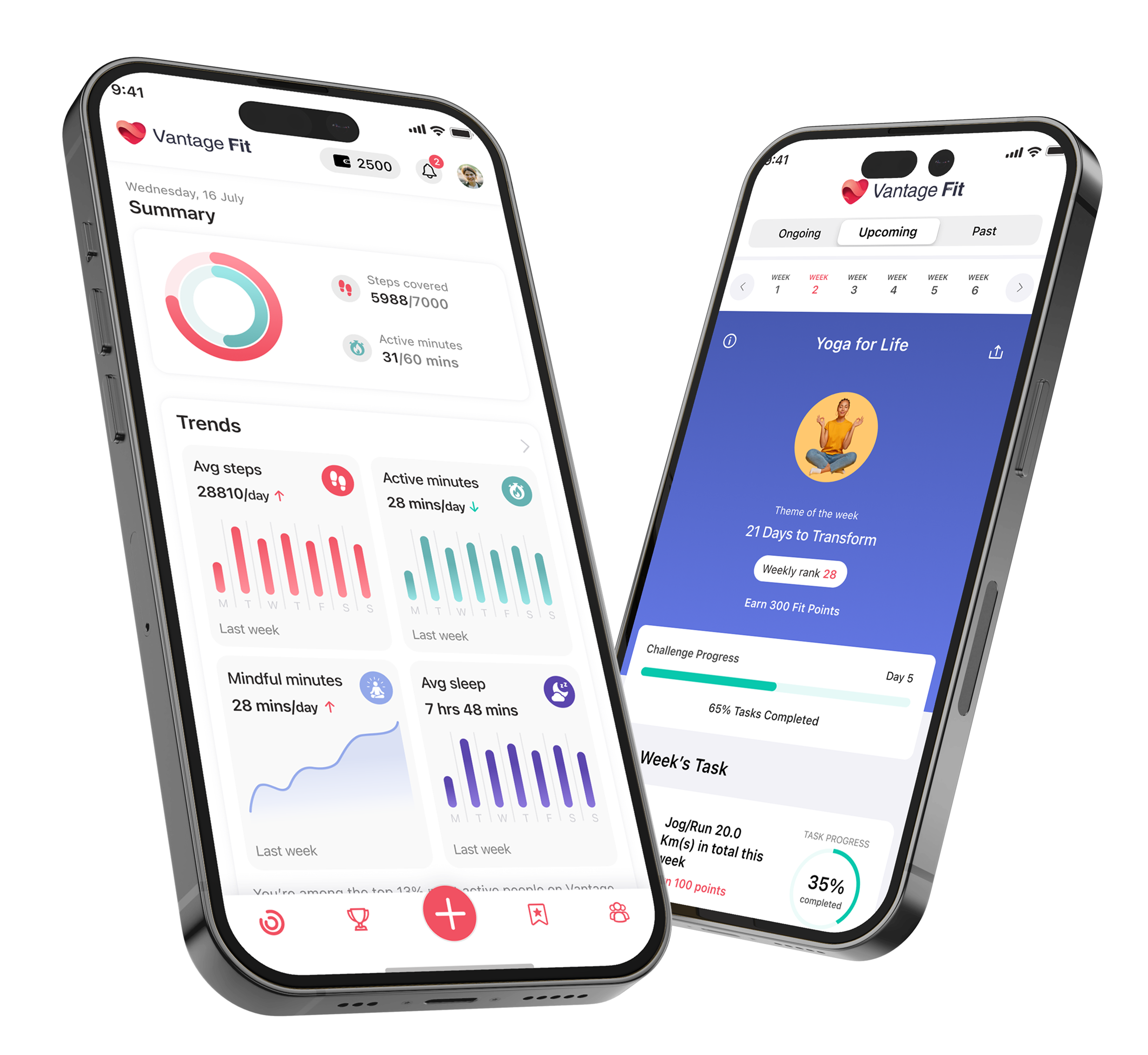
A redesign of the Vantage Fit app home screen — the first thing employees see when they open the app. The brief I set myself was simple to say and hard to do: give almost every feature in the app its own little window on home, so nothing stays buried.
Role
UI/UX Designer
Tools
Figma
Brand
Followed the app's existing design system
Status
Shipped — live in the app
01 — Overview
The screen everyone opens first.
Vantage Fit is the app side of our corporate wellness platform — where employees track steps, join challenges, log activity, and keep an eye on their health. The home screen is the part they land on every single day, so it carries a lot of weight: it sets the tone, and it decides which parts of the app people actually notice.
I worked on this as the UI/UX designer for the home screen, with an earlier version to evolve from and direction from a senior designer on the team. It's the first product screen I've shipped, and a very different muscle from the marketing site I'd done before.
02 — The problem
Good features, hard to find.
The old home had been around for the better part of a decade — roughly seven or eight years — and it showed. There was just a lot of it: everything sat in a long vertical list, so you scrolled and scrolled, and even then a fair number of the app's features never showed up on home at all. They lived a tab or two away, which meant most people never bumped into them. The style had aged out of step with where the product was heading, too.
- Too much scrolling to get through a single screen
- Plenty of features were missing from home entirely
- What you could see felt like a list, not a snapshot
- The visual style had aged
“Instead of making people dig through tabs to find a feature, what if home just showed them everything the app could do?”
03 — The idea
One screen, a window into everything.
So that became the bet: bring almost every feature in the app up onto home, each as its own compact card. Not the whole feature — just enough to glance at and tap into. Your steps, your challenge, where you rank, your health numbers, what your colleagues are up to. The goal was plain: discoverability and usage. If people can see a feature, they'll use it.
What earned a spot — and what didn't — wasn't only my call. It came out of client feedback, a look at what similar apps were doing, and decisions from our product team. And it's built to keep growing: we're already planning to add more to home over time.
Before, and after


A long list became a set of glanceable cards — same information, far less hunting.
04 — What's on home now
Each card is a doorway.
The screen reads top to bottom as a snapshot of your day, then your standing, then the people around you. Every card shows just enough to be useful at a glance, and opens into the full feature when you tap it.
- Summary — one ring pulling steps and active minutes into a single glance
- Challenges — the challenge you're in, your rank, how far along you are
- Weekly trends — steps and active minutes this week against last
- Leaderboard & League — where you stand, and the next league to climb to
- Vitals & Health — the numbers that matter, like fasting sugar and lifestyle score
- Badges — what you've earned so far
- Highlights — your colleagues' recent workouts, routes and badges, with reactions
- Support — help, one tap away
05 — A note on order
Closest to home first.
The sequence isn't random. It starts with you — your activity, your challenge, your trend lines — because that's what you came to check. Then it widens out to how you're doing against everyone else, your health, and finally what your colleagues have been up to. The social Highlights feed and the league were a bigger push on community and a little friendly competition than the old home had, and that was intentional.
06 — Where it stands
It shipped — and it's only the start.
The new home screen is live, and the early feedback has been genuinely good. It did the thing we wanted: more of the app is visible, and people are finding features they used to miss. On the back of that, we've now taken on the rest of the app — bringing the same approach to the other screens, and adding richer analytics with proper graphs and stats so people can actually see their progress over time.
07 — What it taught me
Designing inside something real.
The marketing site taught me how to ship. This taught me how to design inside a living product — one with an existing design system I had to work within, real users with habits, and a senior whose judgement I learned a lot from. The hardest and most useful part was the editing: deciding what's worth a spot on the screen people see most, and what can wait a tap away. That's a muscle I'll use on every product screen after this one.